Administration of users, roles and OAuth (mercury-gui-auth)
The application mercury-gui-auth is a web panel for the data of authentication and authorization of Mercury DB (HgDB) 3.0: local users, role mappings, a read-only view of the LDAP directory, OAuth 2.0 clients and the license key of the panel itself. Until now these data were edited directly in the database. The panel is installed with the server (a WAR next to mercury-ws-app) and is available at /mercury-gui-auth/ui/home.
Sign-in and single sign-on (SSO)
All web applications of the server that use the login form (mercury-ws-app, mercury-gui-registry and mercury-gui-auth) share one sign-in: after logging in to one of them, the others let the user in without asking again, and logging out in one of them logs the user out of all of them. In a cluster this works also across nodes: the state of the sign-in is replicated between the nodes (the valve ClusterSingleSignOn of Tomcat Cluster, see Login and HTTP sessions in the cluster). On a single node it is the plain valve SingleSignOn.
-
In the Docker compositions and Helm charts the valve is inserted into
server.xmlat the start of the container (ClusterSingleSignOnwhenTOMCAT_CLUSTER_MEMBERSis set, otherwiseSingleSignOn). Nothing has to be configured. -
In an installation without Docker add the valve to the
<Host>element ofconf/server.xml:<Valve className="org.apache.catalina.authenticator.SingleSignOn" />For a Tomcat Cluster use
org.apache.catalina.ha.authenticator.ClusterSingleSignOn. Do not addClusterSingleSignOnListenertoserver.xml: the valve registers its listener itself, and the listener has no default constructor, so Tomcat would not start. -
Open the applications through the same host name (for example always
localhostor always the address of the load balancer): the sign-in cookie belongs to the host.
Shared login form
When mercury-gui-auth is installed, registered in the module registry and answers on the same server, the login page of mercury-ws-app and mercury-gui-registry redirects to its form, and after logging in the user returns to the page he asked for. When the application is not there (or is stopped), each application shows its own local form, so the server never redirects to a page that does not exist. The return address is checked: only a path inside a registered application is accepted (no //, no scheme, no ..), so the redirect cannot lead out of the server. A short cookie protects against a redirect loop when SSO does not work.
If the password of a local user has expired, he is first offered to change it in the profile and then returns to the page he asked for.
Roles and sections
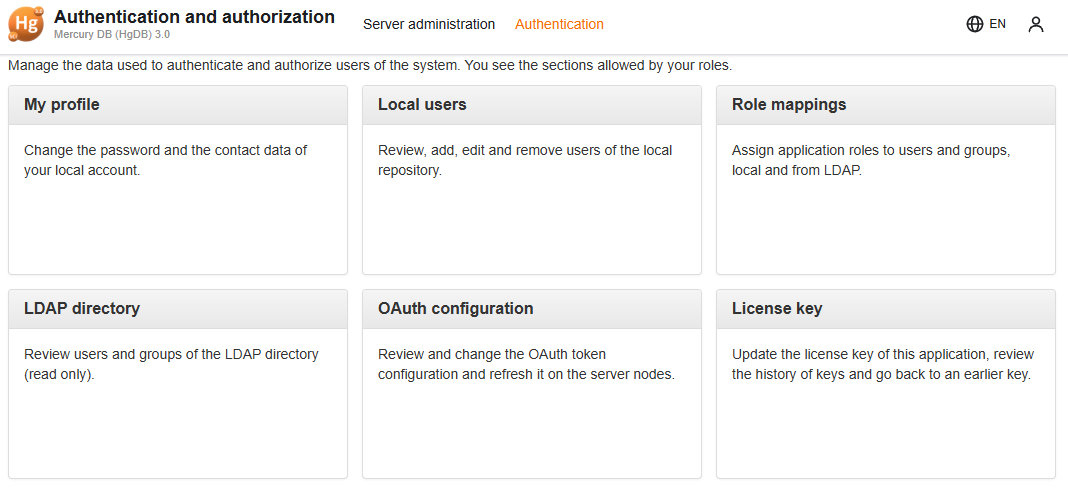
The panel starts with the page Home, which shows only the sections allowed for the roles of the user. Every user with a role mrc-user has his own profile; the other sections need more roles. The role mrc-sysadmin sees everything.
| Section | Address | Required role |
|---|---|---|
| My profile (full name, password) | /ui/profile | mrc-user |
| Local users | /ui/users | mrc-useradmin |
| Role mappings | /ui/role-mappings | mrc-groupadmin |
| LDAP directory (read only) | /ui/ldap | mrc-useradmin or mrc-groupadmin |
| OAuth clients and tokens | /ui/oauth | mrc-sysadmin |
| License key of the panel | /ui/license | mrc-sysadmin |
Every form that changes data carries a CSRF token, and a request without the token or without the role is rejected with 403. The changes are written to the server log: who changed what (never the values of secrets or passwords).
Local users
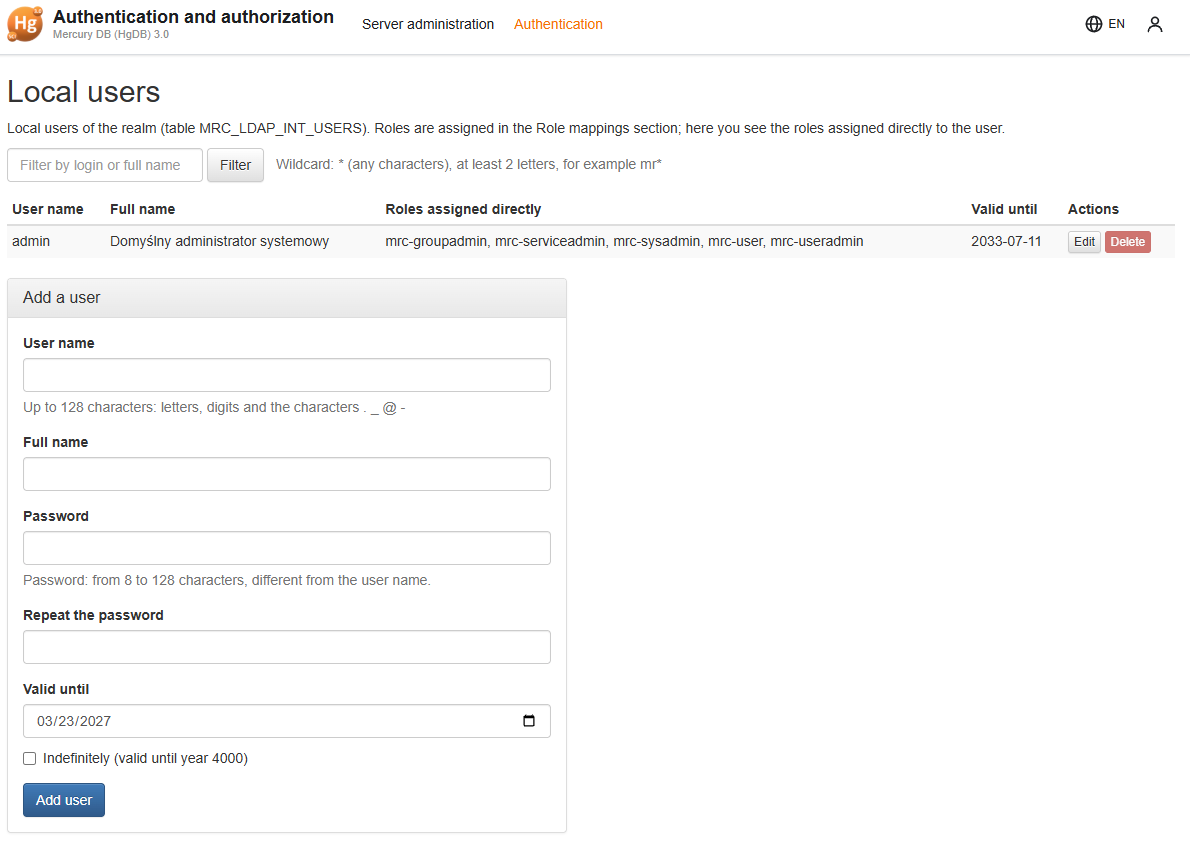
The page lists the users of the local repository (table MRC_LDAP_INT_USERS) together with the roles assigned to them directly. The list can be filtered by login or full name; the filter accepts the wildcard * (at least 2 letters, for example mr*). An administrator adds, edits and deletes users.
- The password is stored as the realm expects it (SHA-1 of
name/password), so a user created in the panel can sign in to all the applications. The name of a user cannot be changed, because it is a part of the hash; allowed characters are letters, digits and._@-, at most 128. - The password has 8 to 128 characters and differs from the user name. A user changes his own password in the profile and must give the current one.
- Password validity. Every password change moves the expiry date by the number of days from the parameter
mercury.gui.auth.password.expirationDaysofmercury.properties(120 by default,0turns the expiry off). The administrator can also choose "never expires" (the date 4000-01-01). After the expiry the user can still sign in (the realm does not block it), but the panel offers to change the password first; the offer can be skipped with "Continue without change" for the rest of the session. - Protection. A user cannot delete his own account. Only a system administrator can change the password of an account with the role
mrc-sysadmin, or delete it (otherwise a user administrator could take over the administrator account). Deleting an account also deletes its role mappings of the typeU.
Role mappings
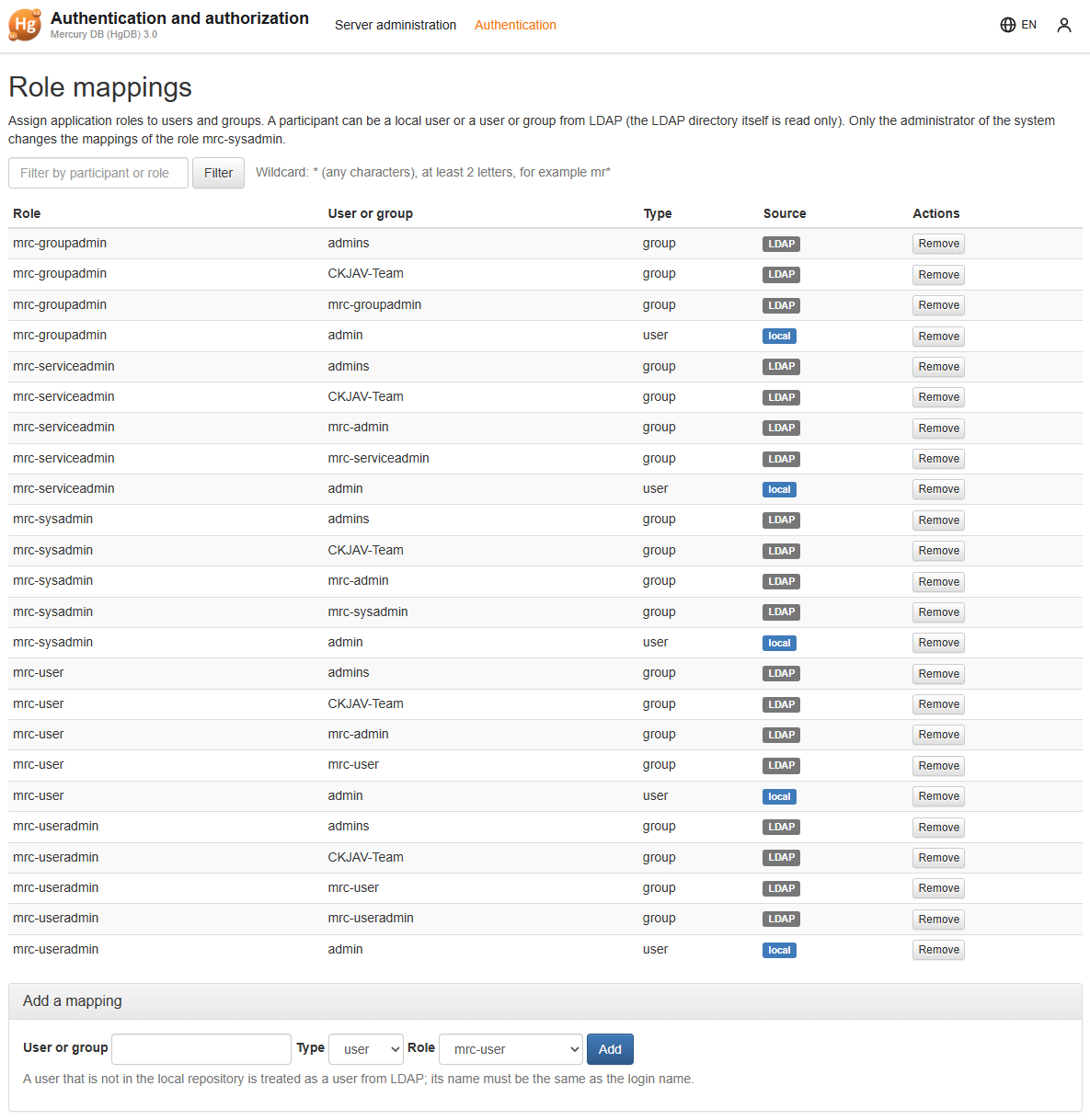
The page edits the table MRC_LDAP_INT_ROLES_MAP (see Groups and roles): a participant (a user U or a group G, from the local repository or from the LDAP directory) and a role. The roles to choose from are mrc-user, mrc-useradmin, mrc-groupadmin, mrc-serviceadmin and mrc-sysadmin, and the roles already used in the table. Rules:
- a mapping of the role
mrc-sysadmincan be changed only by a system administrator, - one cannot take away the administrator role from oneself directly, and one cannot delete the last mapping of
mrc-sysadmin, - a participant that is not a local user is marked as an LDAP one.
LDAP directory (read only)
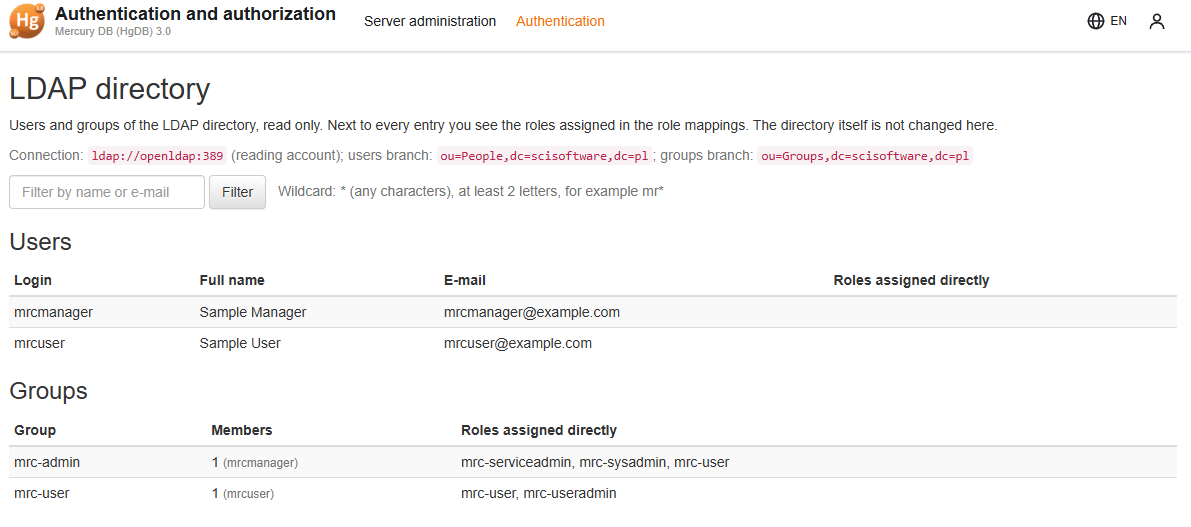
The page shows the users and groups found in the LDAP directory and the roles that the role mappings give them. Nothing is changed in the directory: the application only searches (the filter (uid=*) for users, the object classes groupOfUniqueNames, groupOfNames and posixGroup for groups, at most 1000 entries). The page shows the connection and the branches it reads, and the lists can be filtered by name or e-mail with the same wildcard. The attribute userPassword is never read.
The connection data are taken from the realm of Tomcat (Realm in server.xml) through JMX; the password of the technical user is not shown anywhere. They can be overridden with the parameters of mercury.properties: mercury.gui.auth.ldap.url, mercury.gui.auth.ldap.user, mercury.gui.auth.ldap.password, mercury.gui.auth.ldap.userBase and mercury.gui.auth.ldap.roleBase. This is needed, for example, on a development server whose realm has no technical user and whose directory does not allow anonymous reading. The login attribute is uid.
For the accounts in ou=Technical (for example FrontendAccount, used by the realm) the Docker image of the directory gives read access to the whole tree but not to the passwords (userPassword, sambaNTPassword), and accounts in ou=Admins manage the directory. See Integration with LDAP repository.
OAuth 2.0 clients and tokens
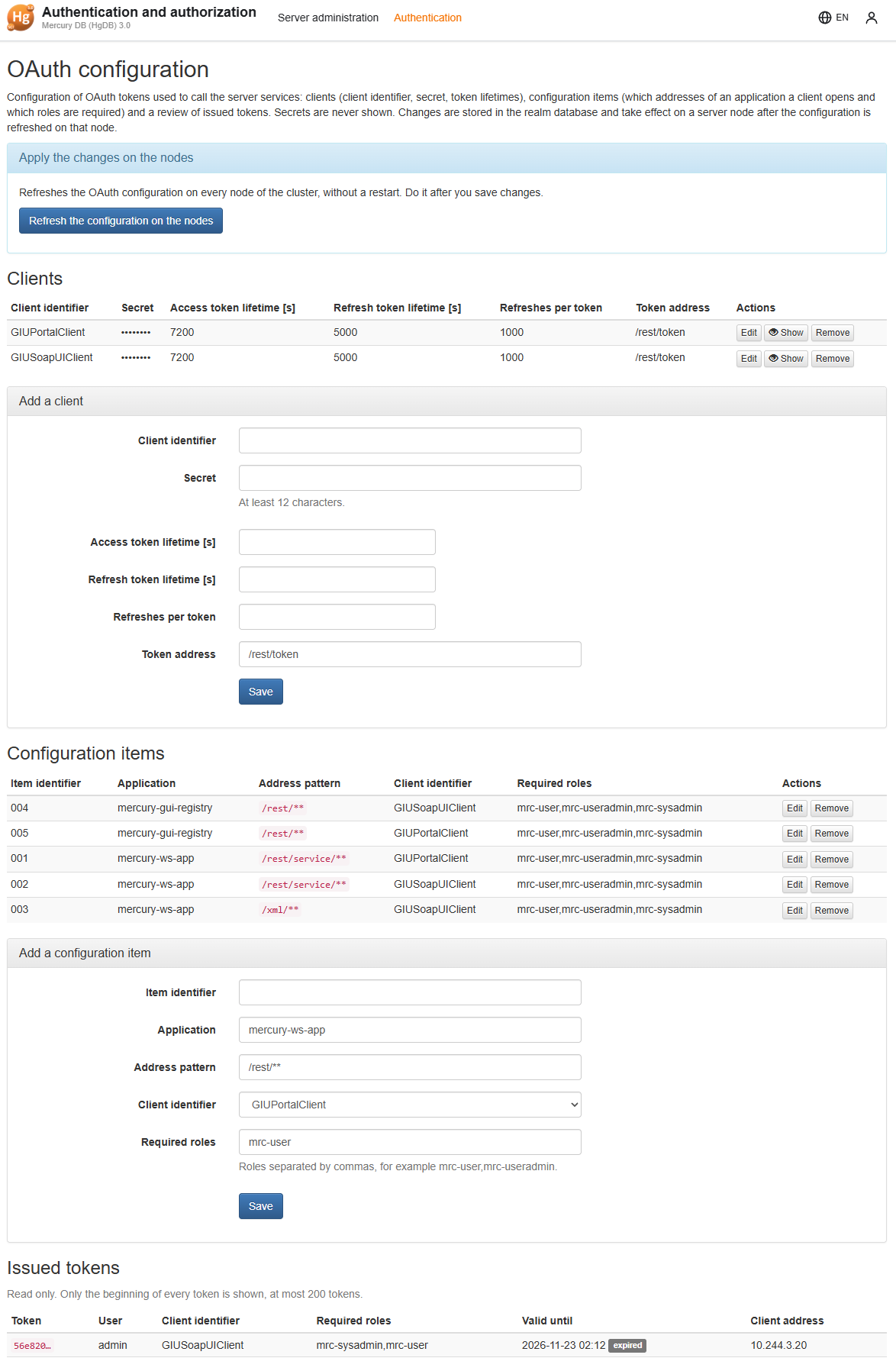
The page edits the configuration of the OAuth service (the tables MRC_LDAP_OAUTH_SERVICE and MRC_LDAP_OAUTH_CONFIG) and shows the issued tokens:
- a client has an identifier, a secret, the lifetimes of the access and refresh tokens and the address where the tokens are issued (for example
/rest/token); the Docker image defines two clients, among themGIUPortalClient, which is also the default client of CMIS with the Basic authentication, - a configuration entry says which address pattern, which HTTP methods and which roles (scope) belong to a client; the secret of an entry is always copied from its client, so both tables stay consistent. A client used by an entry cannot be deleted,
- tokens are read only, shortened to 6 characters, at most 200.
Secrets are never shown in lists or forms: a list shows dots, and an empty secret field in an edit form means "do not change". Changing the secret of a client updates all its entries and deletes the tokens issued to it. A secret has 12 to 255 characters.
Showing a secret
When the secret has to be entered in the configuration of another application, a system administrator can read it after giving his password again (like in a password manager): the button "Show" at the client opens a password form, and after the password is accepted the secret appears in a password field with the buttons Show/Hide and Copy; after 30 seconds the field is cleared. The secret is only in that one response (headers no-store): it does not reach the session, the messages or the log, and the log keeps only who read the secret of which client. Each reading needs the password again. The password of a local user is compared with the realm hash; a user of LDAP is checked with a bind to his LDAP entry (an empty password is rejected). Five wrong attempts in five minutes lock the user for five minutes.
Refreshing the configuration on the nodes
The OAuth configuration is kept in the memory of every node. After a save, the button Refresh calls the refresh on every node of the cluster one by one (through mercury-ws-app, POST /admin/oauth-refresh, role mrc-sysadmin; it uses the REST service OAuthConfigExtRest/refresh). Without the refresh a node keeps the old configuration until its restart.
License key of the panel
The panel has its own license key, separate from the key of the server. The product name comes from the parameter mercury.gui.auth.product.name (by default Mercury DB (HgDB) Authentication Admin) and must be equal to the name inside the key. The file of the key is set by mercury.gui.auth.license.file (by default LicenseKeyAuth.txt next to the file of the server key).
- The keys are kept in the table
MRC_LDAP_LICENSE_KEYSof the realm database (the application creates it itself at the first start, no script is needed). The first key is written only by the MASTER node (the key from the file, or a trial). The file is the reserve: when the database is unavailable the file applies. - The page
/ui/licenseshows the current key and its source, takes a new key (it is checked before saving: decryption, the product name, the date) and keeps the history with the action "Restore" for going back to a previous key. After a save or a restore every node reloads the key (the event goes through ActiveMQ, the Virtual TopicVirtualTopic.MercuryGuiAuthLicenseKeyChanges) and writes it to its file with a backup copy<file>.<yyyyMMdd-HHmmss>.bak. - When the key has expired, the name does not match or the key cannot be read, the panel goes to the read only mode (a banner on every page): the changes of users, mappings and OAuth are blocked, while reading, signing in, changing one's own password, showing a secret and updating the key still work. Without any key the panel starts with a 30-day trial, as the server does.
The key of the server is updated on the page /admin/license of mercury-ws-app in the same way (the table IGO_DA_LICENSE_KEYS of the main database, created by Hibernate when hibernate.hbm2ddl.auto is update, as in the Docker image; when the value is none, as in some development configurations, the table has to be created by hand, otherwise the server logs relation "igo_da_license_keys" does not exist and uses the key from the file). In a cluster the start order matters: the nodes SLAVE wait for the MASTER, so the first key is written by one node only (see Installing on Kubernetes).
One look for both applications
mercury-ws-app and mercury-gui-auth share one presentation template: the top bar with the logo and the name of the application, the links between the two applications, the language menu (Polish, English, German, Spanish, French, Korean; the choice is kept in a cookie shared by the applications) and the user menu (Sign in, or the name of the user with "Profile" and "Sign out"), and the same footer. The home page, the sign-in pages and the profile have a limited width (1080 px, good for a portrait Full HD screen); the other pages of the administration use the whole width of the screen.